
Apex Legends isn’t won by the player with the fullest backpack.
It’s won by the player who gets combat-ready quickly, understands what is actually useful, and knows when to stop searching and start moving.
That matters more than ever in Season 30.
Respawn has tightened the Core loot economy, removed several older high-tier loot sources, changed how Arsenals work, reduced some attachment spawn rates, and completely changed how Energy weapon ammunition works. (EA)
So an older loot guide can give you perfectly reasonable advice that is simply outdated.
This Apex Legends Loot Guide focuses primarily on Core modes—Ranked and Unranked—while explaining where Wildcard works differently. EA currently describes Core as the standard competitive experience and Wildcard as a faster Freestyle mode with a deliberately simplified loot system. (EA Help)
The goal isn’t to teach you how to open every bin on the map.
It’s to teach you what is worth your time.
Apex Legends Loot Guide at a Glance
Need the quick answer?
Use this order:
1. Get a usable weapon
2. Get the ammunition it needs—or understand the weapon’s Energy stockpile
3. Check your starter gear
4. Find additional shields and health healing
5. Get a second weapon
6. Take important upgrades
7. Share useful resources
8. Leave when the next upgrade isn’t worth the time
The simplest version is:
Get ready to fight, then get out.
EA’s current beginner guidance similarly emphasizes getting weapons, matching ammunition, useful attachments, shield and health healing, and increasing inventory capacity without wasting time searching the exact same areas as teammates. (EA Help)
What Should You Loot First in Apex Legends?
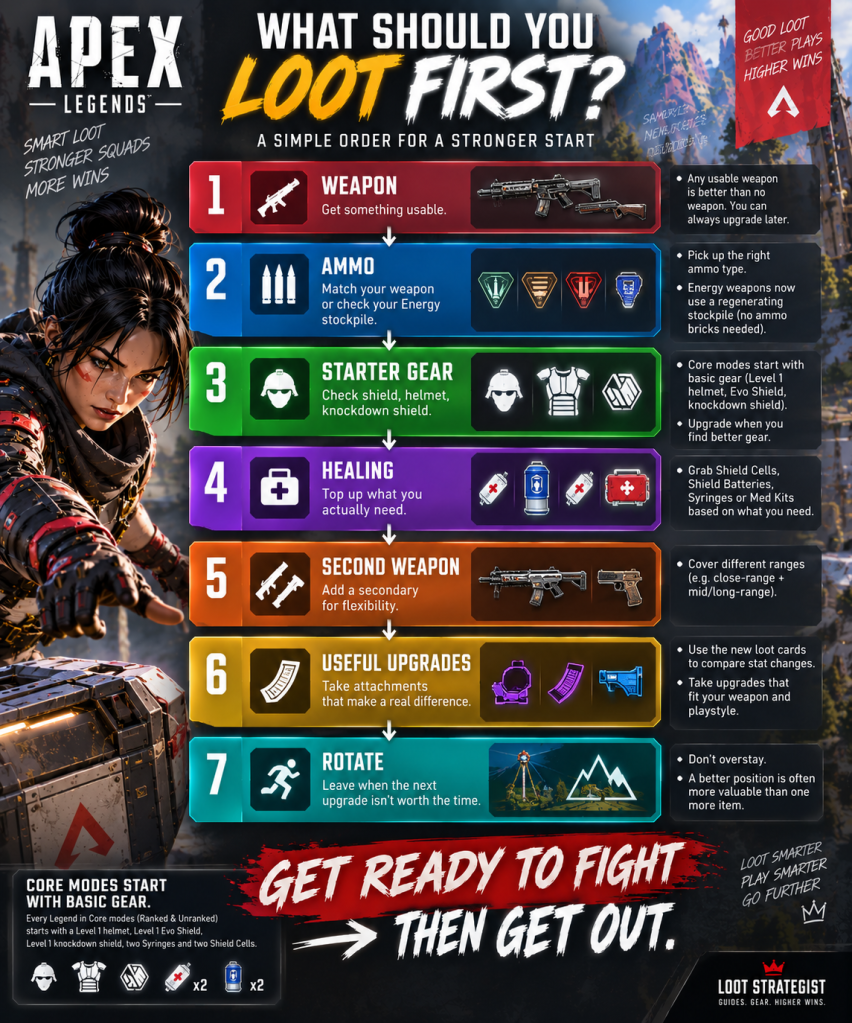
In Core modes, you don’t begin completely empty.
Every Legend starts with a basic starter kit containing a Level 1 helmet, Level 1 Evo Shield, Level 1 Knockdown Shield, two Syringes, and two Shield Cells. (EA Help)
That changes your opening priorities.
Your first goal should usually be:
Weapon → ammo → check starter gear → second weapon → useful healing/resources → upgrades
Don’t spend your opening minute searching for a full inventory.
You don’t need one.
You need enough equipment to survive the next fight.
Core vs. Wildcard Loot
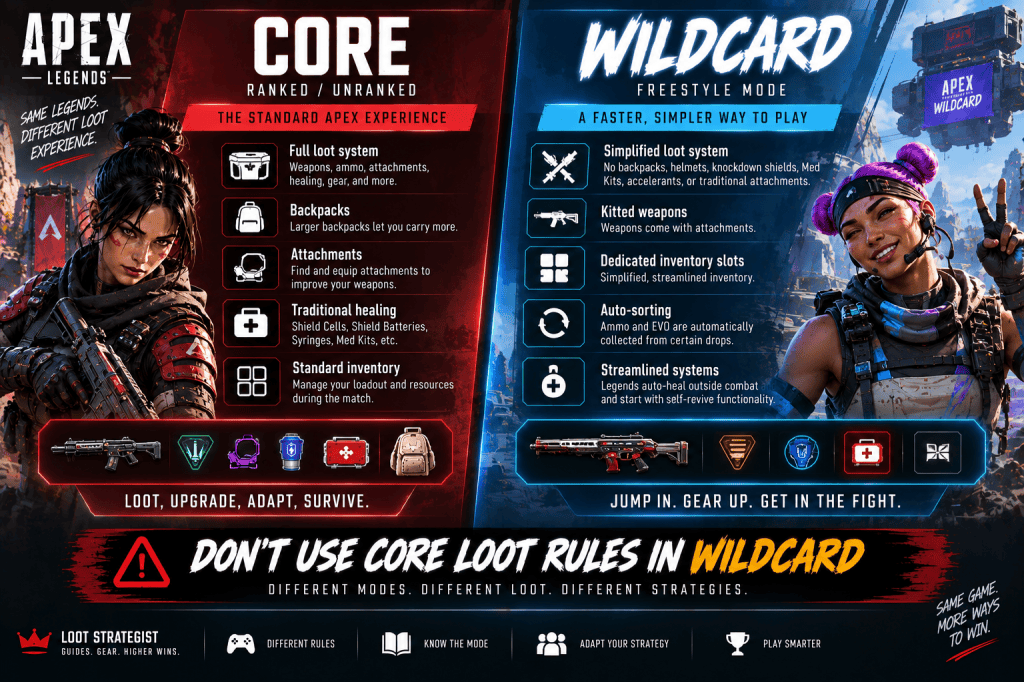
Before going any further, make sure this guide matches the mode you’re playing.
EA currently separates Apex into Core and Freestyle modes.
Core includes:
Ranked
Unranked
Wildcard belongs to Freestyle and uses a significantly simplified loot system. (EA Help)
In Wildcard:
- There are no backpacks, helmets, knockdown shields, med kits, accelerants, or traditional attachments in the loot pool.
- Inventory is simplified into dedicated slots.
- Weapons arrive kitted.
- Ammo and EVO are automatically collected from certain drops.
- Legends auto-heal outside combat.
- Players start with self-revive functionality. (EA Help)
So most of this article is written for Core BR.
That’s important because a loot strategy designed around Ranked doesn’t translate one-for-one into Wildcard.
The First Rule of Looting: Get Combat-Ready
The biggest beginner mistake is trying to build the perfect inventory before you can fight.
You don’t need:
Your dream weapon
Your favorite optic
A full stack of every consumable
Every purple attachment
You need something that can win the next engagement.
Your first usable weapon is usually more valuable than another thirty seconds of searching.
Once you’re capable of defending yourself, your next decision is no longer:
“What else can I loot?”
It’s:
“Is staying here actually worth it?”
Land Close to Your Squad
Looting starts with your drop.
EA currently recommends landing close to your teammates without landing directly on top of them, allowing everyone to search different nearby areas while staying close enough to support one another. (EA Help)
A good landing pattern is:
Same POI
Different buildings
Close enough to help
That is much more efficient than three players opening the same bins.
Don’t Loot the Same Building as Your Teammate
If your teammate is already searching a large building, take another room or another structure.
You are not fighting your squad for loot.
You’re trying to get three players equipped as quickly as possible.
EA specifically advises players not to search exactly the same loot spots, especially in larger buildings. (EA Help)
A simple system works:
Player 1 → Building A
Player 2 → Building B
Player 3 → Building C
Then regroup.
That’s faster than splitting to opposite sides of the map.
The Early-Game Loot Priority
Your first few seconds should be about survival.
1. Weapon
Take the first usable weapon.
2. Ammo
Collect enough for the weapon you’re carrying.
3. Check Your Starter Gear
You already have a basic helmet, Evo Shield, Knockdown Shield, Syringes, and Shield Cells in Core modes. (EA Help)
4. Second Weapon
Once the immediate danger is manageable, complete the loadout.
5. Healing
Top up what you’ll realistically need.
6. Important Attachments
Take meaningful upgrades.
7. Move
Don’t turn preparation into procrastination.
Weapon First, Perfect Weapon Later
Suppose you land and find:
Mozambique
You can use it.
Then twenty seconds later you find:
Peacekeeper
That’s an upgrade.
You didn’t lose anything by taking the first weapon.
The mistake is spending forty seconds refusing every mediocre gun because you are waiting for your favorite.
A bad weapon you can shoot is better than the perfect weapon that hasn’t appeared yet.
How Much Ammo Should You Carry?
There is no universal number that works for every loadout.
Your ammo needs depend on:
Weapon
Fire rate
Range
How often you fight
Inventory size
How quickly your squad rotates
A player using a rapid-fire weapon may burn ammunition much faster than someone playing at longer ranges.
So instead of memorizing:
“Always carry X stacks.”
Use:
Carry enough for the next fight, then adjust based on your actual usage.
That is more flexible and more useful.
Understanding Apex Legends Ammo
EA currently lists the game’s ammunition categories as:
Light
Heavy
Energy
Shotgun
Sniper
Arrows
along with other weapon-specific ammunition rules. (EA Help)
For ordinary weapons, the old rule still applies:
If you need it, carry it.
For Energy weapons, there is an important exception.
The New Energy Ammo System
Season 30 changed Energy weapons substantially.
Traditional Energy ammo bricks were removed from Core and Wildcard.
Instead, Energy weapons come with their own regenerating ammunition stockpile. You no longer need to pick up conventional Energy ammo bricks for those weapons. (EA)
That changes inventory management.
If you’re carrying an Energy weapon:
Don’t reserve backpack space for old-style Energy ammo stacks.
Pay attention to the weapon’s stockpile instead.
The important tactical point is that the stockpile regenerates over time, and regeneration isn’t something you can rely on while continuously firing. EA’s Season 30 documentation explains that the new system replaces traditional Energy ammo pickups with the weapon-specific stockpile. (EA)
So don’t assume:
“I have an Energy weapon, therefore I’m carrying infinite ammunition.”
You still need to manage when and how you’re using it.
Build Your Ammo Around Your Loadout
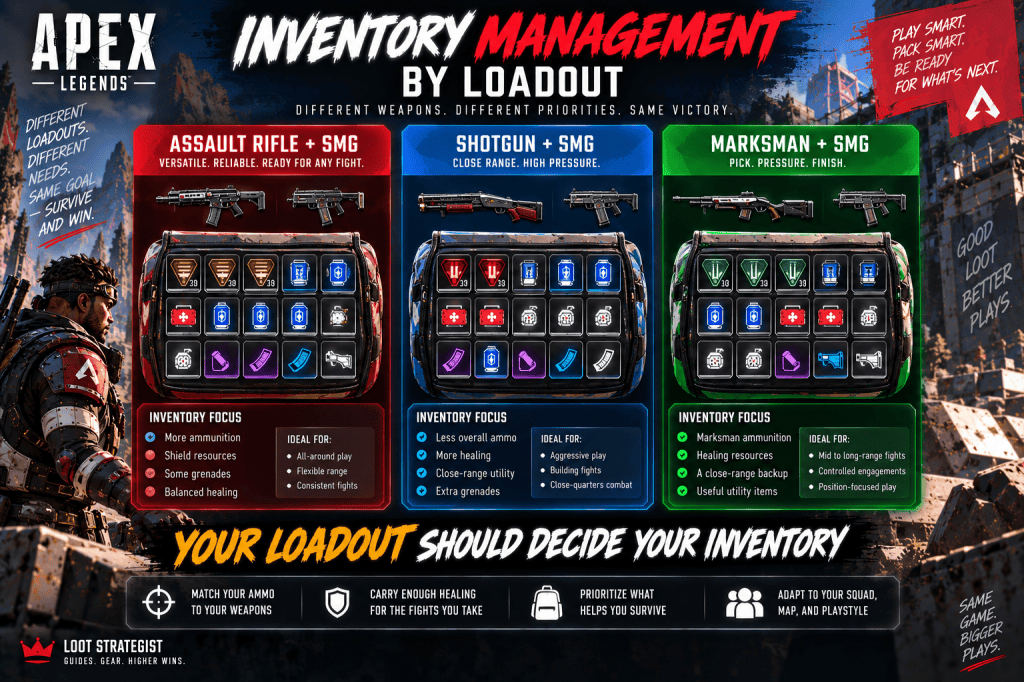
Your two weapons should influence your inventory.
Assault Rifle + SMG
You will often want:
More ammunition
Shield resources
Some grenades
Shotgun + SMG
You’ll typically need:
Less overall ammunition
More healing
More close-range utility
Marksman + SMG
You may need:
Marksman ammunition
A reliable close-range weapon
Enough shields to reset between fights
The exact numbers change.
The principle doesn’t.
Your inventory should serve your weapons, not the other way around.
Attachments: Take the Upgrade That Matters
An attachment is valuable when it changes how effectively you can use the weapon.
Ask:
Does it improve control?
Does it improve handling?
Does it improve the weapon’s practical range?
Will I actually notice the difference?
Does it fit the way I play?
If yes, take it.
If not, save the slot.
Season 30’s New Attachment Loot Cards
Season 30 also made attachments easier to evaluate.
EA added loot cards that show the stat change an attachment will provide when equipped, while weapon pickup cards can compare a weapon you’re holding with one you’re considering. (EA)
That’s useful because newer players no longer have to guess whether a particular attachment is genuinely improving the weapon.
Use the information.
If the improvement is meaningful, take it.
If the change doesn’t matter for your weapon or playstyle, move on.
Corrupted Attachments: Should You Take Them?
Season 30 introduced Corrupted Attachments.
These are deliberately different from ordinary upgrades.
EA describes them as attachments that provide significant stat bonuses while also applying a negative trade-off. Only one Corrupted Attachment can be equipped to a weapon at a time. (EA)
That means you shouldn’t automatically think:
Corrupted = better
Think:
Corrupted = trade-off
An attachment may improve one part of the weapon while making another part worse.
So ask:
Does the benefit suit this weapon?
Can I tolerate the drawback?
Does it match my playstyle?
A powerful downside can outweigh a powerful bonus.
Don’t Chase Every Purple Attachment
This is where rarity becomes misleading.
A purple attachment doesn’t automatically deserve a backpack slot.
Suppose you have:
Good weapon
Good shields
Enough healing
Enough ammo
and then find an attachment that produces only a modest improvement.
Meanwhile, the Ring is closing.
Take the small upgrade only if the time and position justify it.
Otherwise:
Leave it.
Backpacks and Inventory Space
In Core modes, larger backpacks let you carry more resources.
EA’s beginner guidance specifically recommends looking for larger backpacks as part of your normal looting progression. (EA Help)
But more space isn’t automatically better.
A backpack full of:
Unused ammo
Attachments for weapons you don’t use
Too many grenades
isn’t an efficient inventory.
The goal is not:
“Fill every slot.”
It’s:
“Fill the right slots.”
Build Your Inventory Around the Next Fight
Your inventory should change as the match develops.
Early Game
Prioritize:
Weapons
Ammo
Shield resources
Healing
Mid Game
Add:
Better attachments
More grenades
Survival tools
Extra resources for the squad
Late Game
Think more carefully about:
Space
Shield recovery
Grenades
Ammo efficiency
Survival items
By the late game, every slot has more opportunity cost.
Healing: Don’t Ignore Health Recovery
EA’s current beginner guide highlights Shield Cells, Shield Batteries, Syringes, and Med Kits as core healing resources. (EA Help)
Your exact inventory mix depends on your shield status, playstyle, and upcoming fight.
But there is a simple mistake worth avoiding:
Six Shield Batteries + almost no health healing
doesn’t necessarily mean you’re prepared.
You need resources for both layers of survivability.
Shield Healing vs. Health Healing
Shield Cells
Fast and useful for topping up armor.
Shield Batteries
Stronger shield restoration, but slower.
Syringes
Basic health recovery.
Med Kits
Larger health restoration.
You don’t need every item in equal quantities.
You need enough of each to survive the types of damage you’re actually taking.
Grenades Are Inventory, Not Decoration
Grenades can:
Force enemies out of cover
Interrupt a revive
Punish players trapped inside a building
Create space
Block routes
Finish weak enemies
If you use grenades constantly, carry more.
If you never throw them, reconsider whether they’re earning their inventory slot.
Survival Items
EA currently identifies Survival items such as:
Heat Shields
Evac Towers
Mobile Respawn Beacons
as tools that protect or reposition players. (EA Help)
These are situational.
A Heat Shield can be priceless during a bad Ring rotation.
An Evac Tower may transform a dangerous crossing into a manageable one.
A Mobile Respawn Beacon can preserve a match after an elimination.
But if carrying one prevents you from holding essential healing or ammunition, the trade-off matters.
Looting Death Boxes
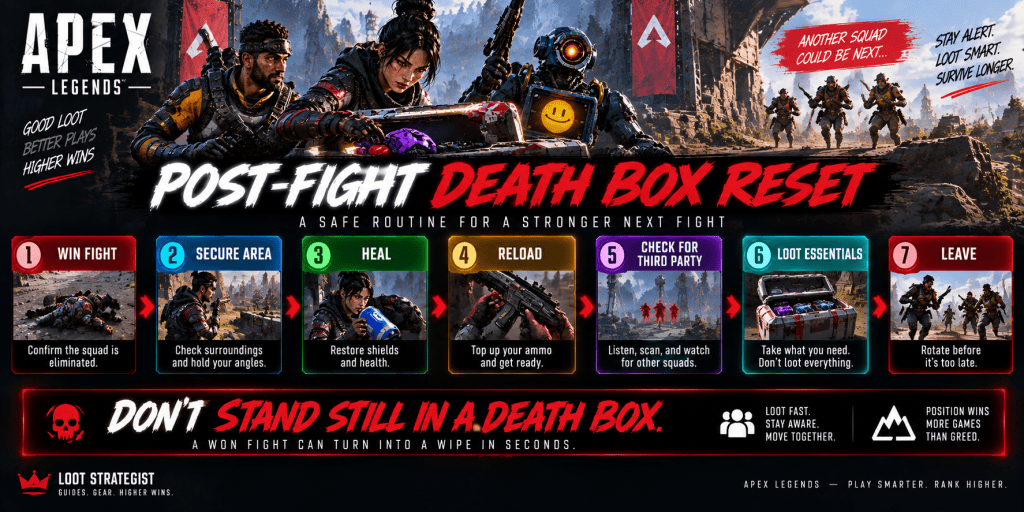
Death boxes are among the richest loot sources in a match.
They’re also one of the easiest places to die.
After a fight, don’t immediately start grabbing everything.
Use:
Secure the area
→ Heal
→ Reload
→ Check for another squad
→ Loot
→ Leave
This is one of the most important loot habits in Apex.
Loot the Best Death Box First
You don’t have to inspect every box.
Look for:
Your missing essentials
Useful ammo
Batteries
Grenades
Important attachments
Better weapons
Resources your teammates need
Take what improves your next fight.
Then move.
The Post-Fight Looting Trap
You win.
Everyone starts looting.
Nobody watches the surrounding terrain.
Another squad arrives.
Now the team that won the fight loses the next one while standing over the first squad’s boxes.
That’s why your reset order matters.
Win the fight.
Recover.
Scan the surroundings.
Then loot.
Looting While the Ring Is Moving
This is another classic mistake.
Your squad finds a death box.
The Ring is already closing.
Someone says:
“Just one more thing.”
That’s how “one more thing” becomes a long run through damage.
Before committing to the box, ask:
How far is the next safe position?
How much time do we have?
Is the loot actually useful?
Are enemies likely to rotate through here?
Sometimes the correct answer is:
Leave the box.
How Long Should You Loot?
There is no perfect number of seconds.
Use a simpler rule:
Once your inventory can support the next fight, your next upgrade should justify the time and risk required to find it.
If you’re already equipped and the area is becoming dangerous, move.
A slightly better backpack won’t save you from being late to the Ring.
The Loot Value Test
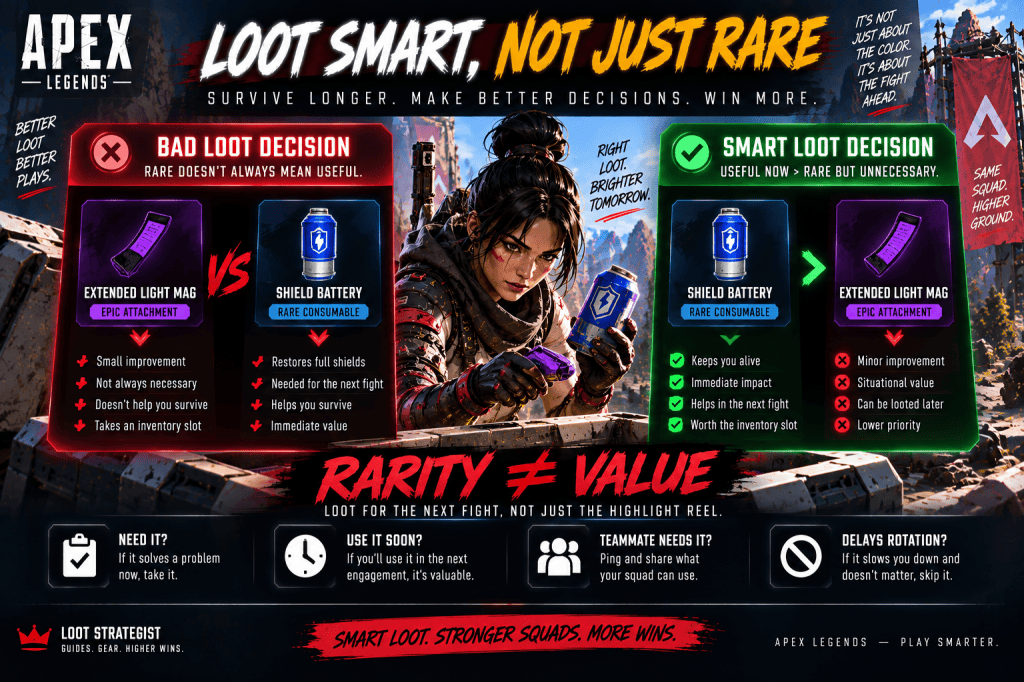
Whenever you’re unsure whether to pick something up, run through five questions:
Do I need it?
Take it.
Will I use it soon?
Probably take it.
Does a teammate need it more?
Ping or share it.
Is it only valuable because of rarity?
Then think twice.
Will it delay our rotation?
If yes, the loot may not be worth it.
This system works better than memorizing a giant list of “must-have” items.
Where Should You Loot?
There is no permanent “best loot spot.”
POIs change.
Loot distributions change.
Match pacing changes.
And Season 30’s World’s Edge update itself changed several named locations and the way players move through the map. EA’s Season 30 materials specifically highlight changes to World’s Edge and its updated POIs. (EA)
So rather than memorizing one sacred landing spot, learn how to evaluate a good POI.
Look for:
Enough loot for your squad
Multiple nearby buildings
A useful next rotation
Manageable contest risk
Access to resources
Good terrain after looting
A POI that gives you slightly less loot but an excellent rotation can be more valuable than a high-loot area surrounded by enemies.
Should You Land at the Highest-Loot POI?
Not automatically.
High-value areas can attract more squads.
That gives you a trade-off:
More potential loot
versus:
More contest risk
In Ranked, that decision matters even more.
A squad capable of winning a contested drop may benefit from it.
A team trying to climb consistently may prefer a quieter landing with enough loot to fight.
There is no universal answer.
Season 30 Loot Changes You Need to Know
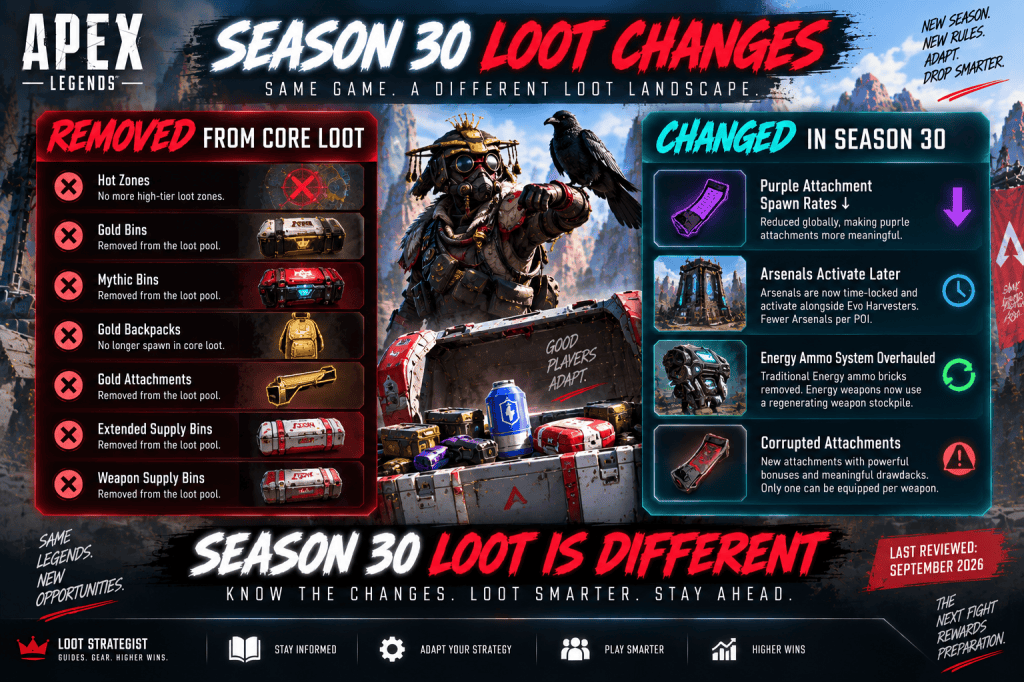
This is the section that makes this guide more valuable than older loot articles.
Season 30 changed the Core loot system substantially.
EA removed:
Hot Zones
Gold Bins
Mythic Bins
Gold Backpacks
Gold Attachments
Extended Supply Bins
Weapon Supply Bins
It also reduced purple attachment spawn rates globally. (EA)
That means older guides that tell you to rely on those systems may be outdated.
Hot Zones Are Gone
This deserves special attention because Hot Zones were a familiar part of older Apex loot advice.
Season 30 removed them from Core loot. (EA Help)
So don’t use an old “land at the Hot Zone for guaranteed top-tier loot” strategy as though it still describes the current Core game.
That’s precisely why this article should be reviewed after meaningful loot-system changes.
Gold Backpacks and Gold Attachments Are Gone From Core Loot
Season 30 also removed Gold Backpacks and Gold Attachments from the normal Core loot pool. (EA)
The notable exception is the 4–10x Digital Sniper Threat Sight, which EA says remains unaffected by the broader Gold Attachment removal. (EA)
That means a modern loot guide shouldn’t tell players to spend their entire drop searching for the old Gold-item system.
Purple Attachments Are More Meaningful Now
EA reduced purple attachment spawn rates in Season 30 while maintaining the overall attachment quantity. (EA)
That makes meaningful attachment upgrades a little more significant.
But the basic rule still stands:
Don’t delay a rotation just because you haven’t completed your ideal loadout.
How Arsenals Work Now
Season 30 also changed Arsenals.
They no longer activate immediately at match start.
Instead, they activate alongside Evo Harvesters, and EA reduced the number of Arsenals available per POI.
Their Upgrade Panels can upgrade an attachment slot by one tier, with Purple as the maximum, and can provide an Optic when a weapon doesn’t already have one. (EA)
That makes an Arsenal more useful as part of your mid-match upgrade path than as an automatic first stop after landing.
Don’t Confuse Loot With Progression
Apex now has several systems that interact with equipment and progression.
You have:
Loot
EVO
Legend upgrades
Arsenals
Replicators
Survival items
The best route isn’t always:
“Get every upgrade immediately.”
Sometimes the better route is:
Loot essentials → rotate → gain EVO → revisit upgrades when safe
Think in terms of match tempo.
Smart Looting for Solo Queue
Solo queue creates another challenge.
You can’t assume your teammates will:
Share ammunition
Ping useful loot
Rotate quickly
Stop looting
Watch the Ring
That makes self-sufficiency more valuable.
Carry enough to survive without constantly relying on someone else’s inventory.
But still ping useful resources.
EA explicitly recommends using pings to communicate loot and other important information. (EA Help)
For the broader strategy, see our Apex Legends Solo Queue Guide.
Smart Looting for Ranked
Ranked makes time and risk more important.
A loot detour may cost:
Position
Ring timing
Information
Health
A safer rotation
Before extending a loot trip, ask:
Does this upgrade materially improve our chances in the next fight?
If the answer is no, move.
That habit can be worth more than another rare attachment.
Don’t Become the Squad’s Inventory Manager
Helping teammates is good.
Managing every item they own is not.
Ping useful equipment.
Share excess resources.
Give someone a Shield Battery when they need one.
But don’t stand in one building for two minutes because somebody still wants a particular optic.
At some point, the best loot decision is:
Go.
Loot Faster by Learning Your Loadouts
The more weapons you understand, the faster you loot.
Suppose you see:
Assault Rifle
You already know what ammo and attachments make sense.
Suppose you find:
SMG
You know what secondary range it covers.
That reduces decision time.
You don’t have to stand there debating every item.
Your loadout makes the decision for you.
Stop Reopening the Same Bins
This sounds almost too obvious.
It’s also common.
You search an area.
You walk twenty meters.
Then come back.
Then reopen the same bin.
You probably missed something.
That’s okay.
Keep moving.
Apex rewards momentum.
Don’t Loot an Area After It Has Become Unsafe
This is a critical distinction.
An area can go from:
Safe
to:
Maybe unsafe
to:
Definitely unsafe
very quickly.
Gunfire starts nearby.
A squad rotates through.
The Ring shifts.
Your escape route closes.
Your loot priorities should change immediately.
Don’t keep looting simply because you started.
A Smart Looting Routine
Here’s the entire process in one sequence:
Land
Stay near teammates and spread across nearby buildings.
Arm
Find a usable weapon and its ammunition.
Stabilize
Check your starter gear and top up your healing.
Equip
Take a second weapon and useful upgrades.
Share
Ping or give teammates what they need.
Rotate
Leave once the next upgrade no longer justifies the time.
Reset
After every fight, heal, reload, check your surroundings, then loot.
Rebuild
Replace resources as you spend them.
That’s the loop.
Common Apex Legends Looting Mistakes
Staying Too Long in One POI
More loot isn’t automatically more value.
Chasing the Perfect Loadout
A functional loadout is enough to fight.
Taking Every Rare Attachment
Rarity doesn’t guarantee meaningful value.
Carrying Too Much Ammo
Unused ammunition occupies space.
Ignoring Healing
Good weapons don’t compensate for an empty healing inventory.
Looting Immediately After a Fight
Another squad may already be coming.
Forgetting the Ring
The best death box in the world isn’t worth dying outside the zone.
Ignoring Teammates
Looting is a squad activity.
Treating Gold as Automatically Better
Season 30 has also changed which Gold items even exist in Core loot. (EA)
Using Old Loot Guides
Live-service games punish outdated information.
A Simple Core-Mode Loot Checklist
Before leaving your landing area, ask:
Do I have a usable weapon?
Do I have the correct ammunition or understand my Energy stockpile?
Have I checked my starter gear?
Do I have a second weapon?
Do I have shields and health healing?
Do I have enough resources for the next fight?
Does my squad need anything?
Do we know where we’re rotating?
If the answers are mostly yes:
Leave.
Loot Rule
The best loot isn’t the rarest loot. It’s the loot that keeps you alive long enough to use it.
A purple attachment is useless if you die carrying it.
A full backpack doesn’t matter if your squad is trapped outside the Ring.
A perfect loadout doesn’t help if you spent five minutes building it while another team took the best position.
Good looting is a balance between:
Resources
Time
Risk
Position
Squad needs
The strongest looters aren’t the people who search everything.
They’re the people who know when they’ve found enough.
Final Thoughts
Looting looks simple.
Open a bin.
Pick something up.
Move on.
But good loot management is really a game of priorities.
You need a weapon before you need the perfect attachment.
You need enough ammunition before you need another stack of grenades.
You need a survivable position before you need one more purple upgrade.
And after a fight, you need to know whether it’s safe to loot at all.
Season 30 makes those decisions even more important. Hot Zones are gone. Gold Backpacks and Gold Attachments are out of the normal Core pool. Purple attachments are less common. Arsenals activate later. Energy weapons use regenerating ammunition instead of traditional Energy ammo bricks. Corrupted Attachments add meaningful bonuses with trade-offs. (EA)
So don’t approach Apex loot as a hunt for the rarest possible inventory.
Approach it as a question of tempo:
What do I need now?
What will help in the next fight?
And is the upgrade worth staying here for?
Get equipped.
Get organized.
Take what matters.
Then move.
Related Apex Legends Guides
Apex Legends Beginner Guide — Learn the fundamentals of landing, movement, weapons, healing, positioning, and squad play.
Apex Legends Best Legends Guide — Find the right Legend for beginners, Ranked, solo queue, mobility, support, defense, and other playstyles.
Apex Legends Tier List — See which Legends currently dominate the Season 30 meta and why pick rate isn’t the same as power.
Apex Legends Settings Guide — Optimize FOV, sensitivity, graphics, audio, controller, and FPS settings.
Apex Legends Solo Queue Guide — Learn how to adapt to random teammates, communicate, and make better decisions without a premade squad.
Apex Legends Squad Composition Guide — Learn how to combine Legend classes and squad roles into a more effective team.
Sources & Updates
Last reviewed: September 7, 2026
This guide primarily covers Core Apex Legends modes, including Ranked and Unranked. EA currently distinguishes Core from Freestyle modes such as Wildcard; Wildcard uses a much simpler loot and inventory system and is therefore not treated as the default context for the loot recommendations above. (EA Help)
EA’s current beginner guide was used to verify Core-mode looting advice, including landing near—but not directly on top of—teammates, splitting nearby loot areas, prioritizing weapons and ammunition, and gathering useful healing and equipment. (EA Help)
EA’s current terminology guide was used to verify the Core-mode starter kit, Shield Core, Supply Bins, Survival items, and other core loot terminology. Every Legend in Core modes starts with a Level 1 helmet, Level 1 Evo Shield, Level 1 Knockdown Shield, two Syringes, and two Shield Cells. (EA Help)
EA’s official Season 30: Marked Patch Notes were used to verify the removal of Hot Zones, Gold and Mythic Bins, Gold Backpacks, Gold Attachments, Extended Supply Bins, Weapon Supply Bins, and the reduction in purple attachment spawn rates. The same source was used to verify the updated Arsenal system, weapon-comparison loot cards, attachment stat cards, and the new Energy ammunition system. (EA)
EA’s current Season 30 documentation also confirms that Energy weapons now use regenerating ammunition stockpiles rather than traditional Energy ammo bricks, and that Corrupted Attachments provide strong bonuses with negative trade-offs and are limited to one per weapon. (EA Help)
EA’s Season 30 materials were also used to verify the current World’s Edge updates and changed POIs. Because map layouts and loot conditions can change, this guide deliberately avoids claiming that one location is a permanently “best” loot spot. (EA)
Editorial note: Loot priorities, inventory recommendations, rotation advice, and other strategy in this article are Loot Strategist editorial guidance. They are not official EA rules and should be adapted to the player’s weapons, squad, map, mode, and playstyle.
 Gaming Guides, Builds, Loot & Strategies